Help
Here we try to answer questions that site visitors/users may have about the features/services provided by this blog. I want to receive the latest news, how do I do it? To read the latest news published by this blog, there are basically three ways:
- Save our blog address in "Favorites" in Internet Explorer or Opera (Ctrl+D) or "Bookmarks" in Mozilla Firefox (Ctrl+Shift+D)
- Subscribe to our feed, adding it to a feed reader. This is the most suitable option for those who wish to read several blogs and news sites. If you want to know more about it, we have written special help on that topic which you can find at the following link: What is RSS, feed reader?
- Subscribe by email, to receive our newsletter
What is email subscription?
It is possible to receive the news published on this blog in your email. The service, called Newsletter (NL), is provided through Google Feedburner and consists of receiving an email in the inbox that the user indicated when subscribing, which will be sent only on days when a post has been published and will consist of only one email. If several news items were published on a given day, that email will contain all the news published that day. If no news is published on a day, the NL will not be sent.
How do I subscribe to the NL?
To subscribe you must follow this link: http://feedburner.google.com/fb/a/mailverify?uri=UNC&loc=es_ES By clicking the link indicated above, a small form will appear in a new window where you must indicate two things: a-The email address where you wish to receive the NL b-You must type the letters and/or numbers shown in an image. This is to prevent spam. It is intended to prevent the creation of routines or programs that automatically follow this type of link and fill out the form with a specific email address. By having to type the letters and/or numbers shown in an image, this is mostly prevented. However, it could happen that someone, carelessly or intentionally, fills out that form with an email address that is not their own, but a third party's. For this reason, to complete the subscription process, a third step is necessary: After filling out the form with your email address (and the indicated letters and/or numbers), an email will be sent to the indicated address containing a confirmation link. It is necessary to follow that link to confirm the subscription. Otherwise, it will remain unconfirmed and the NL will not be sent.
How do I stop receiving the NL?
If you already receive the NL in your email inbox, check any NL delivery and look at the very bottom of it. There you will see a message like the following: You are subscribed to email updates from Últimas noticias del cosmos To stop receiving these emails, you may unsubscribe now. Email delivery powered by Google Inbox too full? The bold part, in your NL, should be a link. Click on that link and you can unsubscribe from receiving the NL.
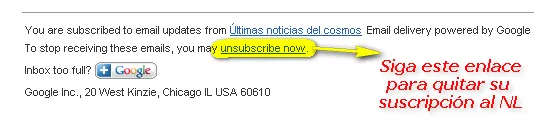
Unfortunately, that part of the NL is in English. Google Feedburner surely allows configuring the service so that portion appears in Spanish. If you are subscribed to the NL through several email addresses and wish to unsubscribe from all of them, you must repeat the procedure (click the link that says "unsuscribe now" that appears in the NLs of each subscribed address. This is because that link varies depending on the address from which you subscribed. If for some reason the text cited above does not appear in your NL, we suggest you look in a previous delivery (some prior day). Some users indicate that sometimes that link does not appear in their NLs. Our monitoring of the NL, however, never detected that problem, but if it happens to you, you can let us know through our contact form. In the message you send us, please clearly indicate the email address to which you are subscribed and from which you no longer wish to receive the NL. We will contact you shortly to inform you of the result of the management, for your peace of mind. If you have changed your email address and wish to continue receiving the NL, but at a new email address, you must unsubscribe from the email account from which you no longer wish to receive the NL and subscribe again, with the new address, following the steps indicated above for unsubscribing and subscribing. It is possible that if the modification is due to a change in your internet provider and you do not have a copy of the emails received up to that point, you may not have an NL from which to proceed with unsubscription. In that case, send us a message through our contact form clearly indicating the email address from which you no longer wish to receive the NL. We will contact you to inform you of that management, for your peace of mind. To subscribe again, however, it will not be necessary for you to write to us, as you will only need to follow the link indicated in the previous section.
How do I print a blog post or save a post as a pdf?
I use a PrintFriendly development below each post with a light blue icon that says "Print". Clicking it will open a new window from which it is possible: -Print the content, choosing whether to print the images or not and you can even select only a portion of the text to print. -Save the content (all or part) in pdf format.
How do I share a post with other people?
Below each post there are options to send by email and share on the most well-known social networks.
How do I comment on a blog post?
Below each post there is a Disqus form. You can access there with a Disqus user or with the user of the most well-known social networks. How can I see previous posts from the blog? The blog can be navigated in different ways: a-Chronologically, by month and year, through the archive that appears in the side panel b-By tag or category, from the back panel c-Through the links "Older posts" or "Recent posts" that appear at the bottom of the blog d-Through the blog's search engine, below.
What are cookies and how do I manage them?
We have explained the topic in our Legal Notice.
Do you have other doubts, questions or suggestions?
Let us know your ideas or questions through our contact form.