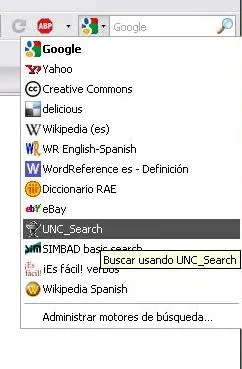
Here we try to answer questions that site visitors/users may have about the features/services provided by this blog.
I want to receive the latest news, how do I do it?
To read the latest news published by this blog, there are basically three ways:
- Save our blog's address in "Favorites" in Internet Explorer or Opera (Ctrl+D) or "Bookmarks" in Mozilla Firefox (Ctrl+Shift+D)
- Subscribe to our feed, adding it to a feed reader.
This is the most suitable option for those who wish to read several blogs and news sites. If you want to know more about it, we have written special help on that topic which you can find at the following link:
What is RSS, feed reader? - Subscribe by email, to receive our news bulletin
What is email subscription?
It is possible to receive the news published on this blog in your email. The service, called Newsletter (NL), is provided through Google Feedburner and consists of receiving an email in the inbox that the user indicated when subscribing, which will be sent only on days when a post has been published and will consist of only one email. If several news items were published on a given day, that email will contain all the news published that day. If no news is published on a day, the NL will not be sent.
How do I subscribe to the NL?
To subscribe you must follow this link:
http://feedburner.google.com/fb/a/mailverify?uri=UNC&loc=es_ES
When you click the link indicated above, a small form will appear in a new window where you must indicate two things:
a-The email address where you wish to receive the NL b-You must type the letters and/or numbers shown in an image. This is to prevent spam. It is about preventing the creation of routines or programs that automatically follow this type of link and complete the form with a specific email address. By having to type the letters and/or numbers shown in an image, this is mostly prevented.
However, it could happen that someone, carelessly or intentionally, completes that form with an email address that is not their own, but a third party's.
For this reason, to complete the subscription process a third step is necessary:
After having filled out the form with your email address (and the indicated letters and/or numbers) an email will be sent to the indicated address containing a confirmation link. It is necessary to follow that link to confirm the subscription. Otherwise it will remain unconfirmed and the NL will not be sent.
How do I stop receiving the NL?
If you already receive the NL in your email inbox, check any NL delivery and look at the very bottom of it. There you will see a message like the following:
You are subscribed to email updates from Últimas noticias del cosmos
To stop receiving these emails, you may unsubscribe now.
Email delivery powered by Google
Inbox too full?
The part in bold, in your NL, should be a link. Click on that link and you can unsubscribe from the NL delivery.
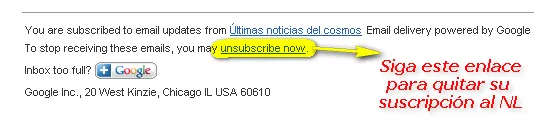
Unfortunately, that part of the NL is in English. Google Feedburner will surely allow configuring the service so that portion appears in Spanish.
If you are subscribed to the NL through several email addresses and wish to unsubscribe from all of them, you must repeat the procedure (click the link that says "unsuscribe now" that appears in the NLs of each subscribed address. This is because that link varies depending on the address from which you subscribed.
If for some reason the text cited above does not appear in your NL, we suggest you look in a previous delivery (some prior day). Some users indicate that, sometimes, that link does not appear in their NLs. Our monitoring of the NL, however, never detected that problem, but, if it should happen to you, you can let us know through our contact form. In the message you send us, please clearly indicate the email address to which you are subscribed and from which you no longer wish to receive the NL. We will contact you as soon as possible to inform you of the result of the management, for your peace of mind.
If you have changed your email address and wish to continue receiving the NL, but at a new email address, you must unsubscribe from the email account from which you no longer wish to receive the NL and subscribe again, with the new address, following the steps indicated above to unsubscribe and subscribe.
It is possible that if the change is due to a change in your internet provider and you do not have a copy of the emails received up to that point, you do not have an NL from which to proceed with the unsubscription. In that case, send us a message through our contact form clearly indicating the email address from which you no longer wish to receive the NL. We will contact you to inform you of that management, for your peace of mind. To subscribe again, on the other hand, it will not be necessary for you to write to us, as you will only need to follow the link indicated in the previous section.
How do I print a blog post?
Enter a blog post. Once the page has finished loading (after a few seconds), you can have a print preview of the page through your web browser. Go to File/Print Preview. There you can preview the post and will have a menu from which you can modify the margins and other parameters, if you wish.
The blog is designed so that, when printing, the two sidebars (on the right) do not appear. This was designed this way because when wanting to print a post, what really matters is its content and not the content of the sidebars (blog archive, tags, etc.).
How do I save a post as a pdf or send a post by email to someone?
In each post there is a set of icons (at the bottom). Two of those icons have those functions:
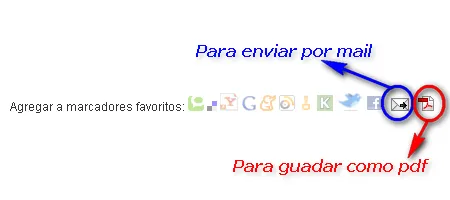
The red icon is a link, which opens in a new window/tab, to the Web2PDF site, which offers the service of converting registered web pages into pdf files. You will have to wait a while for the pdf to be created, after which a dialog window will appear asking you if you want to save the file on your computer and where. It is possible that, at times, this service is not available.
If you are an OpenOffice user, you can do the following:
Go to the post that interests you, select the entire post (or the part you want, normally a post starts at the date and ends after the image credits), copy that selected portion and paste it into a new Write file in OpenOffice. Then export as pdf.
To send a post by mail, you can follow the link of the icon in question, which will open your email and insert the URL of the chosen post, or you can do it manually: Select and copy the address that appears in your browser's address bar and paste that address into a new email. If what you want is to send the content of a post directly (not the url address) you can select the text, copy it and paste it into a new mail. It is possible that, in this way, the images of the post will not appear. You can also select the text and images of the post, paste the selection into a new rich text file (OpenOffice Write, MS Office Word, or similar), save the file (as pdf, odf, doc) and send it as an attachment in an email.
How do I comment on a blog post?
Below each post there is a contact form.
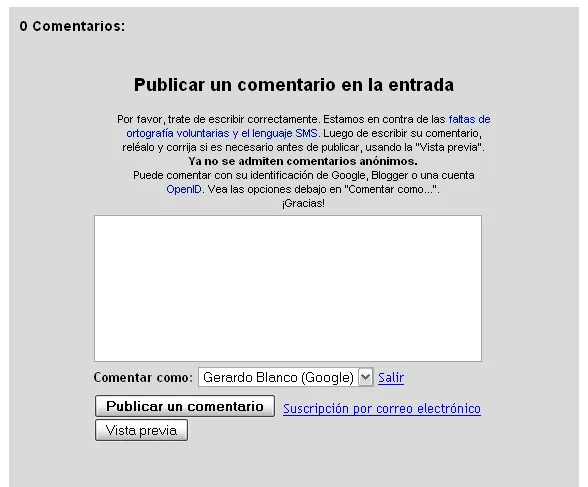
To be able to comment you must identify yourself. The identification options are shown in that form: a Google account, LiveJournal, WordPress, TypePad, AIM, OpenID.
If you do not have an account in any of these services, you will not be able to make any comments on the blog. Registering with OpenID is free and has the advantage that on many websites there is the possibility of identifying yourself through your OpenID identity. To learn more, consult at OpenID.es.
If you ask a question in your comment and are interested in reading the answer that the author of the post and another reader may give, there is the possibility of subscribing to the comments of that post, in your email.
If you wish to subscribe to all comments made on the blog, follow this link:
http://www.noticiasdelcosmos.com/feeds/comments/default
How can I put a link or an image in the comments of a post?
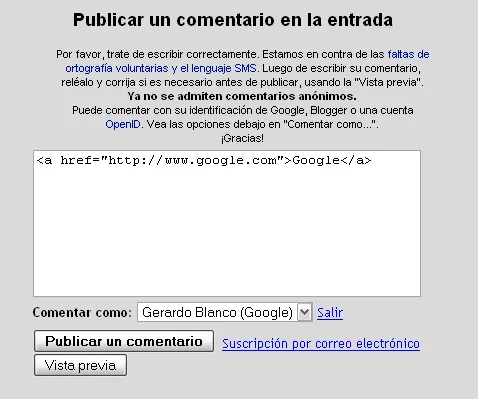
The comment form allows for some formatting of the content. If you want to put a link follow these parameters:<a href="http://URL">Texto del enlace</a>
where URL is the web address of your link and "Link text" (which is what is called "Anchor text") is precisely that, the text of the link.
If you want to put an image in a comment, since you cannot insert an image, what you can do is save it on some website and put the link to your image in the comment.
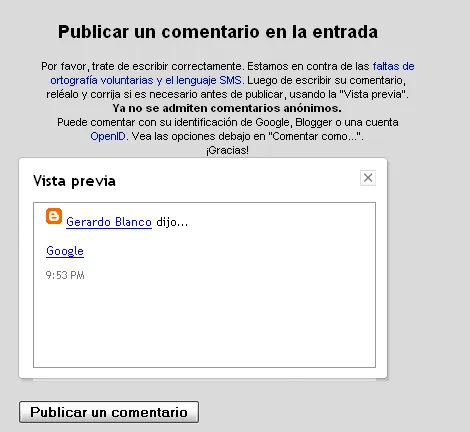
It is recommended to use the "Preview" option. Below we show how to write the code for a link in the contact form, using the Google site as an example. And we also show how the comment preview is displayed.
How can I see previous posts of the blog?
The blog can be navigated in different ways:
a-Chronologically, by month and year, through the archive that appears in the side panel b-By tag or category, from the back panel c-Through the "Older Posts" or "Recent Posts" links that appear at the bottom of the blog d-Through the blog's search engine, in the side panel
What are cookies and how do I manage them?
We have explained the topic in our Legal Notice.
How can I avoid seeing advertising on the blog?
If you are a Firefox user, you can use an add-on called AdBlockPlus that allows you to block segments of images, flash files, etc., according to your taste.
If you use Internet Explorer 8, the site Genbeta seems to have the solution:
"How to block advertising in Internet Explorer 8".
If you use Internet Explorer 7, you can use IE7Pro.
In Opera: from the root directory of the drive where we have the browser installed, look for the file urlfilter.ini
That is a file that lists the web addresses that the browser must filter, that is, not show. The advertisements that are inserted into web pages or blogs come from some website, so if we add the addresses of those sites, we will be able to browse the pages we want but on which those advertising segments coming from the filtered sites will no longer load.
A list of sites to filter can be found at:
http://pgl.yoyo.org/adservers/serverlist.php?hostformat=operafilter;showintro=0
(That list contains a huge number of addresses from which advertising segments originate. But also videos. It is recommended to edit that list manually, to each one's liking).
It goes without saying that I have nothing to do with the sites or programs cited above nor am I responsible for their use. The information is provided as an indication, as a basis for the user to know some of the many options available.
Do you have other doubts, questions or suggestions?
Let us know your ideas or questions through our contact form.