Eyes On the Solar System is a new NASA site where you can visualize planets, moons, asteroids, comets, and space missions.
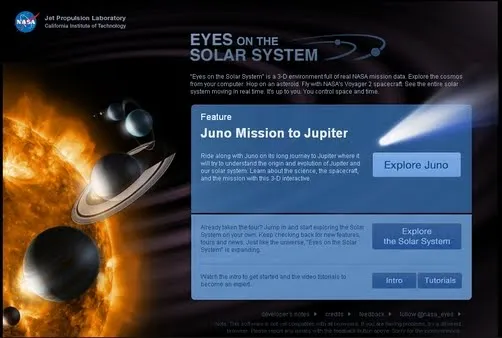
The "Eyes on the Solar System" (EOTSS) interface, which means "Eyes on the Solar System," combines video game technology and NASA data to create a space navigation environment.
"It's the first time the public has the ability to see the entire solar system and our missions together, in real time," said Jim Green, director of the Planetary Science Division at the U.S. Agency.
The environment uses the Unity 3D engine to display the object models, which involves downloading and installing a plug-in, available on the site.
The site is entirely in English, although it is possible to operate the site without knowing that language, as it is very intuitive and simple to use.
What can you do?
When you enter for the first time, you will have to download Unity Player. After installing it on our computer, we will see how to enter the site.
The first thing presented are "Guides" (Tours), along with the site's main navigation button.
Upon entering we will see an interface composed of a main section and a dock-type menu at the bottom. This menu can be hidden. From there we will be able to:
-Choose Destination: among the various objects of the Solar system, moons, asteroids, comets, and NASA space missions.
-Change the date and time: it is possible to see the movement of objects in "real time," as well as see where a space mission was located on a given date.
-Change the speed: If we look at the solar system from the outside, seeing the orbits of the planets, they will move around the Sun at a real rate, considering their true speed. But it is possible to change this, since it is ultimately a simulation, and have the planets move much faster and slower. When doing so, the date will change.
-Among the visual controls we can choose which objects to render (all and only some), display the data in the metric system or in English (by default), and the lighting.
Changing the lighting allows us to see the objects better, but in an "artificial" way, while natural lighting gives a better idea of how sunlight reflects off the bodies of the system. This also allows us to visualize our world at night, artificially illuminated.
Tools
The site has a couple of very interesting tools, related to length measurement and comparison:
When selecting an object, for example and mainly a spacecraft, we can right-click and choose the "Compare" option, which will show us three options: compare with a scientist (woman), a bus, or a stadium. Immediately after, the selected object is shown and, next to it, the comparison object, giving us a relative idea of the size of the objects.
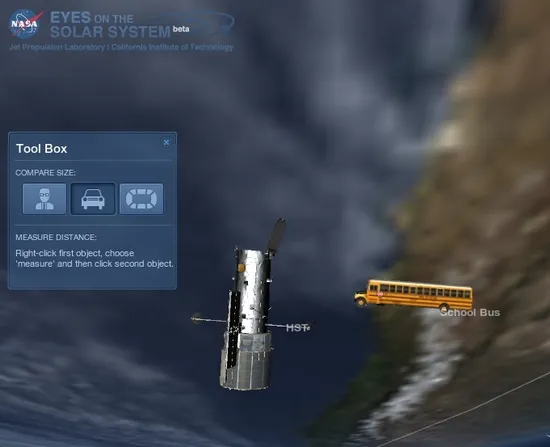
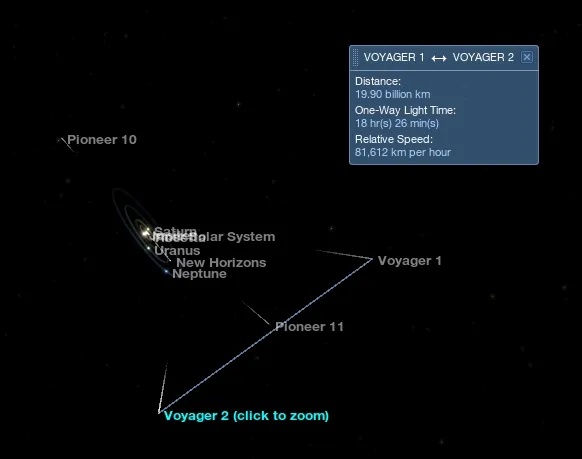
It is also possible to select an object, use the right mouse button and select: "Measure distance from". Then we must choose another object and a small window will appear with the distance between them.
This can be done between spacecraft (Voyager1 and Voyager 2, for example), between spacecraft and cosmic objects, and, of course, between the objects themselves. For example, we can measure the Earth-Moon distance.
The tool can be combined with the one that allows us to change the date, so that we can visualize how the distance of the Earth-Moon system changes over time, in the past or in the future.
Other options provided by the application are to see where a spacecraft is now or where it was on a certain date. We can choose past missions, which will immediately change our date, and a notification will appear on screen.
The New Horizons probe, on its way to Pluto, would arrive in 2015. The tool allows us to visualize that future.
Planets, in detail
The visualization of planetary systems is great. Each system shows the moons that compose it, as well as the missions that are or were there.
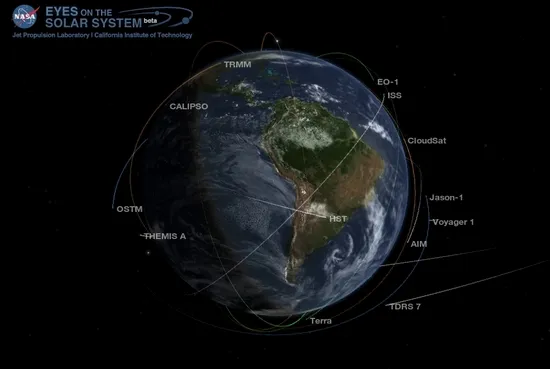
In the case of Earth, the satellites orbiting our world can be shown, including Aquarius, the Hubble Telescope, or the International Space Station.
And more...
Our cosmic neighborhood can be seen with much magnification or less and from different angles. Easily, with the mouse, we can change the way we see the space landscape and move freely. But there is also a tool to "lock" two objects, with the right mouse button and the "Lock" option.
Furthermore, the interface can be viewed in 3-D. If we have anaglyph glasses we can "trip out" with this tool.
In the menu, multimedia content related to the part of the solar system we are navigating will appear, and it is possible to see in a small separate window which area we are in, like a map, as well as specific information about the objects we select.
Stars, Galaxies, Nebulae, Eclipses?
Among the rendering options appear stars, galaxies, and nebulae, but it is noted that they cannot be displayed yet. It says "in development," which suggests that it will be available in the future, even though the application is about the Solar System.
Regarding eclipses, we must think the following: we see an eclipse because we are on the surface of the Earth. With this application we will navigate as if we were "flying" among the objects, outside of them, not on their surface. That is why, logically, we cannot expect to see the same thing here on Earth as with this application. We will not see the Sun being hidden by the Moon, nor the Earth shadowing our satellite.
However, when there is a solar eclipse, the Moon comes between the star and the Earth, generating a shadow on the surface of our world. Photos have been taken of the maximum of a total solar eclipse showing a darker area of Earth. This, as far as I tested, is not visualized in this application.
Regarding spacecraft models, in some cases what is shown are provisional models, not "three-dimensional" rendered ones, but lower quality illustrations. This is noted on the site, with a sign.
In short, the application can be a good tool for outreach and teaching, as well as personal fun for those who enjoy these topics.
The fact that it is in English may be an impediment to its use in countries where languages other than English are spoken, but since the names of the objects, in English, are quite popular and dates and speeds do not require much interpretation, it should be operable without major difficulties by those who do not know the language, although they may encounter some stumbling blocks.
The fact that stars, nebulae and galaxies are not visualized is fine, since it is about seeing the solar system, although stars are seen, many or few depending on what we indicate in the visual controls, but not in an individualized form.
Compatibility
Among the notes, the developers of EOTSS point out that the use of the Unity 3D engine gives them multi-platform capabilities, although that is a challenge, as it is not compatible with Linux systems, so it is only compatible with Windows and Mac OS X systems.
It is necessary to have JavaScript enabled, so the browser we use and the options our installation has may be a stumbling block. According to the developers, they found the best compatibility with Firefox. They do not recommend the use of Chrome for this reason, as they point out that undesired results are obtained, such as links that do not work. With Safari and Internet Explorer, they indicate, they did not find major problems, except for some cases in Safari. Beyond those four browsers, they did not test others. I must say that I tested it on Chrome under Windows XP SP3. My experience was good, although at one point the application generated an error and I had to restart the browser. I was running other programs simultaneously.
Among the notes are the additions that were continuous since March of this year.
A view of the application and what is possible can be seen in the following video, narrated in Spanish, about the use of EOTSS. Without audio, the video is understood just as well (maybe better!).
Video: Eyes on the Solar System
http://www.youtube.com/watch?v=RFb4I5Qq1a8
Sources and related links
About the images
- Screenshots of EOTSS taken by me, under Win XP SP3, Google Chrome, 1024x768.