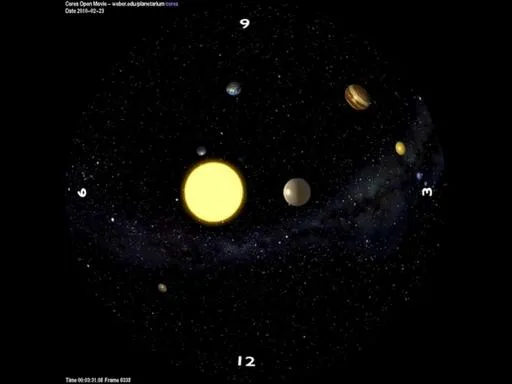
It is an augmented reality "star viewer" that, like a personal planetarium, simulates the sky according to our location on the globe and provides information about astronomical objects.
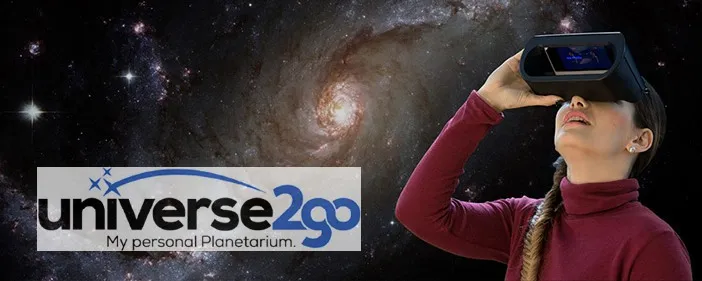
Virtual reality is among us and astronomy has been no exception. I will comment here on some tests performed on a new device that uses the concept of augmented reality and can be used as a teaching tool or mere entertainment.
Universe2Go is a two-component device: the "hard" part consists of a viewer, which is nothing more than a personal projector. The other part is "soft": an application for smartphones.
Here we already find a first restriction or requirement: the device does not work if you do not have a cell phone. Smartphones are considered to be those phones that have certain operating systems that allow installing applications. The soft requirements are high: the phone must have a maximum size (which rules out other similar devices like tablets), certain operating systems, available memory space to install a "heavy" application, and, fundamentally, it must have 4 sensors: compass, GPS, accelerometer... and gyroscope. The first three are more common in mid-range smartphones, but the gyroscope we will only find in some phones. Without a gyroscope the application does not work.
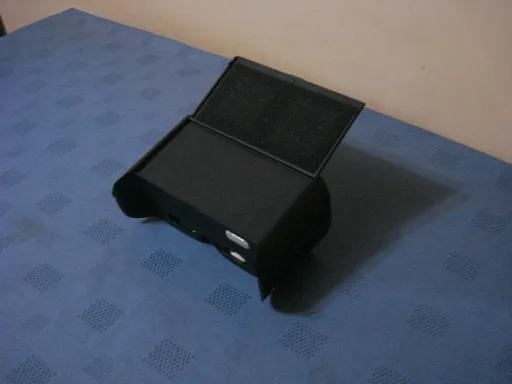
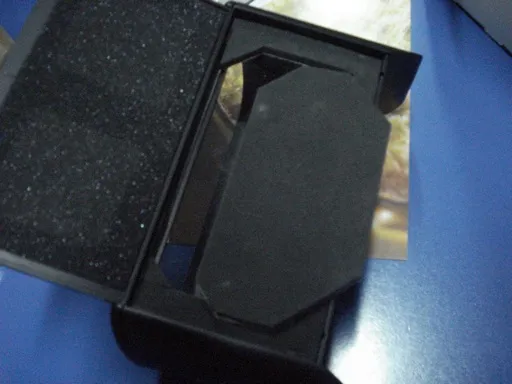
Before continuing with the description of the soft and its requirements, let's go back to the beginning. Whoever owns a Universe2Go viewer, what they will have in their hands is a device with shape and dimensions similar to binoculars. It has an opening inside which we will find a space to place a cell phone. The smartphone cannot have dimensions larger than 147x74x11 mm. This opening or passe-partout is lined with a material similar to foam rubber. This material is in turn divided into irregular polygons: one large polygon and other smaller ones (triangles). The idea is to remove this material to place the phone in the opening and use the small parts to fill empty spaces that could cause some movement of the smartphone. In this way, the phone will be secure, immobile, in the opening, which is closed with a door, by pressure.
The viewer consists of two other openings for the eyes. Inside, the viewer has two concave circular mirrors, so we can say it is a projector for whatever is displayed on the phone's screen. The projection allows us to experience the viewing in a way analogous to when we view the dome of a planetarium.
The application
The app is obtained, for free, in the Google Play and Apple Store stores. There are versions in English and French.
The language is important for the menu as well as for the audio aids. In this case, we tested the English version.
It requires as OS: Android with version 4.2 or higher; Apple iOS with operating system 7.0 or higher.
We did the tests with a group of friends using a Samsung S3 mini. It should be mentioned in this regard that of the phones that meet the hard requirements, it is among the mid-range ones. It has processing speed limitations compared to other phones like iPhones. These tests, therefore, are partial. I have tried to test the viewer on an iPhone, but since I am not an owner of one, I depend on third parties and I have not been lucky enough to get a test with someone who has one, so far.
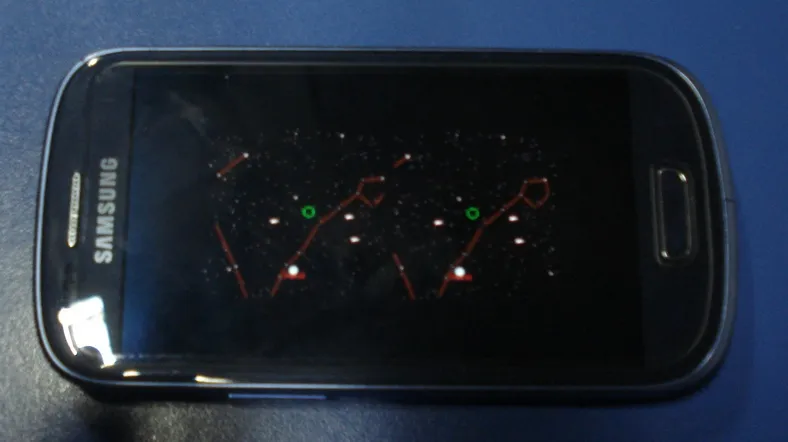
The size of the Samsung in question is ideal because it fits just right in the opening without needing to add anything in the passe-partout. As is logical, if you receive a message while using the phone there, you hear a notification and if you receive a call the application in use is interrupted.
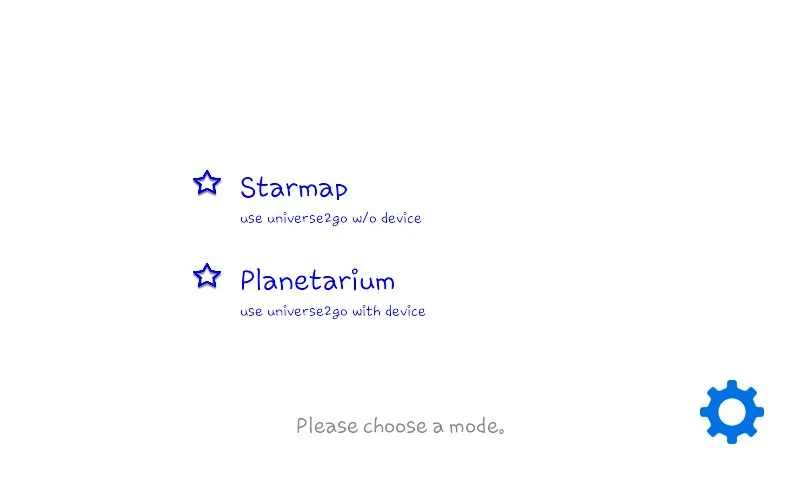
Once the application is downloaded and installed on the phone, we have two options:
The Star Map option (Starmap), similar to applications like Google Sky Map, which works very well precisely because it requires a gyroscope and other sensors. This option is free and does not require the use of the glasses.
The other option is Planetarium. When trying to access it will require a code. Although the application is free, this mode can only be used with such a code that comes in the product box. The code is inserted only the first time and then it does not require it again.
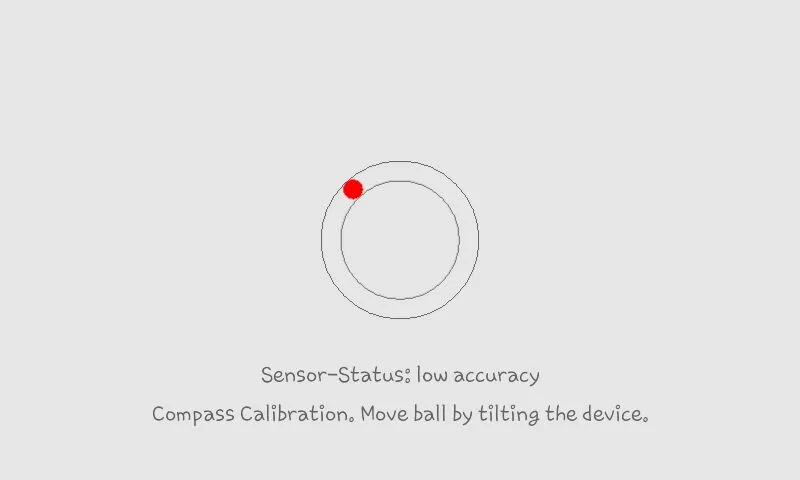
Immediately the application will ask us for a calibration which consists of moving, rotating, the phone so that a red ball moves around a circle on the screen. After performing this operation for a few seconds, we must complete the calibration in a very dark room or environment.
Although it looks like binoculars, it is a planetarium, that is, it simulates the visible (and non-visible) sky objects from our location on Earth, so it is not necessary to be outdoors, although it is possible to use it outside as well. But it is essential to use it in very dark environments, otherwise we will not see the screen.
So once calibrated, we open the viewer and turn the phone over which will immediately emit an auditory notification, a sign that we can place it in the opening of the glasses. Turning it over means, putting the screen face down, with the back of the phone towards us.
Once the phone is placed in the opening, we close the door by pressure, making sure the phone does not move and is secure. Then, we will look through the eye openings and focus on some point.
The calibration ends there by default, but the application has options for greater calibration that can be adjusted manually.
However, we will not be able to press the phone's screen when it is inside the glasses. How will we choose options and modes?
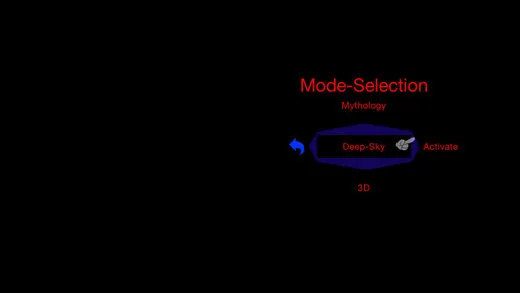
A menu will appear on the screen with various modes of using the Planetarium, namely:
Beginner, Explore, Mythology, Deep Sky, 3D, Questions, Search and Expert Mode.
On the product's website these modes are described:
BEGINNER MODE
A first look at the sky: In this mode, you will simply direct your gaze towards the sky and from the first moment you will see the firmament. The pocket planetarium will recognize the constellation you are pointing at and will draw the lines connecting the constellation. Then, the name of the constellation will appear: if you stay for about 2 seconds on the name, the audio explanation will begin. This way you can discover the constellations one by one. In a short time you will not only know how to locate them, but you will be able to share interesting knowledge about them with your children.
EXPLORE MODE
Dive deeper into the constellations! In this mode you'll become a true explorer. Point at a star in a constellation to get information about its distance and brightness. For the brightest stars you can listen to the audioguide's explanations, because stars can often tell us amazing stories.
MYTHOLOGY MODE
The sky is the origin of humanity's oldest legends: Greek mythology. Recognize the constellations, observe the ancient drawings and listen to the information. How was Cetus, the sea monster, defeated? Why did Cassiopeia attract the wrath of the gods? Let yourself be carried away by the heroic stories about kings, monsters or curses and discover why they were immortalized in the sky.
DEEP SKY MODE
Immerse yourself in the depth of the universe. Discover nebulae where stars are born. Be amazed by star clusters almost as old as the entire universe. Or leave our Milky Way and contemplate the fascinating galaxies located millions of light-years away. Enjoy fantastic color photographs taken with professional telescopes such as, for example, the famous Hubble Space Telescope. Simply point at the object for two seconds and the viewer will focus and zoom in on the object.
3D MODE
The 3D mode increases the feeling of immersion in space when using Universe2go, allowing you to feel as if you were flying through the universe aboard a spaceship.
QUESTION MODE
Play! The sky is very well suited for playing star quizzes. Where is the constellation Cygnus? And the Corona Borealis? Test your knowledge. You have three attempts to find each constellation.
SEARCH
Universe2go works like a true navigation system, only in this case for the universe. Choose the sky object whose position you want to find and Universe2go will show you the way to the target with arrows.
EXPERT MODE
Finally, in the expert mode you have the possibility to set your preferred configuration. Which sky objects do you want to appear and with what information? We leave it up to you!
In our subjective opinion, we consider that the first modes seem to have a greater didactic-educational purpose, which does not mean they are not also entertaining; while the Search and Expert modes are more practical, ideal for accompanying a real observation with binoculars or amateur telescopes and locating faint objects.
On the other hand, it occurs to me that it could be a way to obtain complementary information about objects being viewed with telescopes at a public outreach event. It's no coincidence that it's a device created by amateur astronomers.
The 3D mode creates a sense of depth, for example, by showing us the constellation lines "in front" of other elements.
APPLICATION HANDLING
To choose between the modes, since the phone is inside the glasses, we must move our head and the glasses up and down so that the options change, stopping on the chosen one. To return to the menu, it's enough to lower your head and the glasses toward the floor.
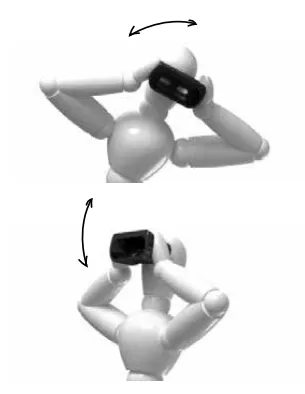
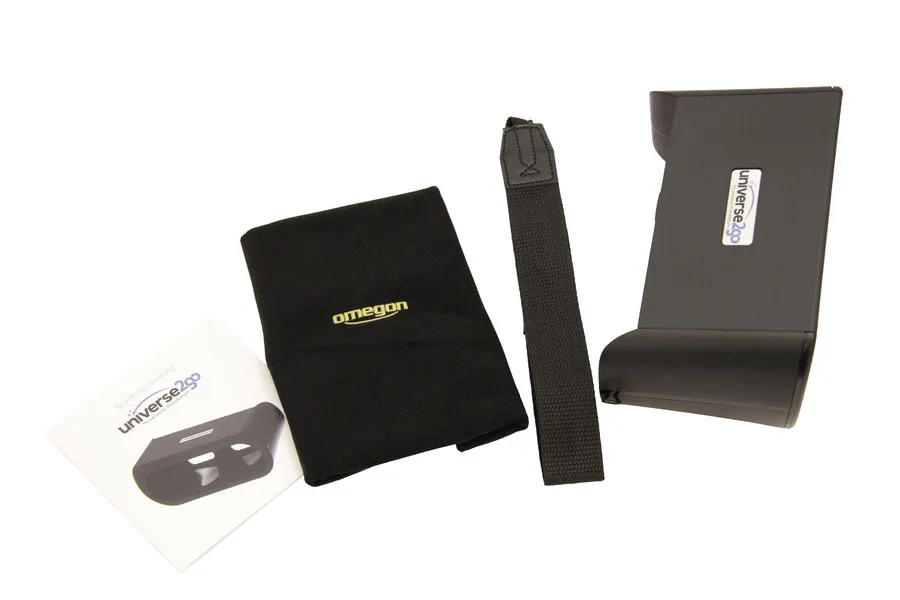
This is why the glasses must always be held with the hands and/or use the straps that come in the box, along with a carrying bag and the manual.
Handling the application in this way is somewhat tedious at first until we get used to it. But once we manage to handle it, the use can be addictive and we can spend hours "looking at the sky" even if it's cloudy!!
DIFFICULTIES: THE DARK SIDE
Based on the limited tests performed, it is possible to conclude that the glasses+application device has the following drawbacks:
-It's for few people, as it requires a mid-to-high-end phone. With a mid-range cell phone we experienced delays, surely due to not having enough processing power.
-Energy is consumed very quickly, so if we want to use it on an observation night or in any other circumstance for a good while, it is necessary to first fully charge the cell phone battery.
-The app is difficult to handle, although it can be solved with a bit of practice and a minimum effort that the enthusiastic amateur will surely have, but not all people.
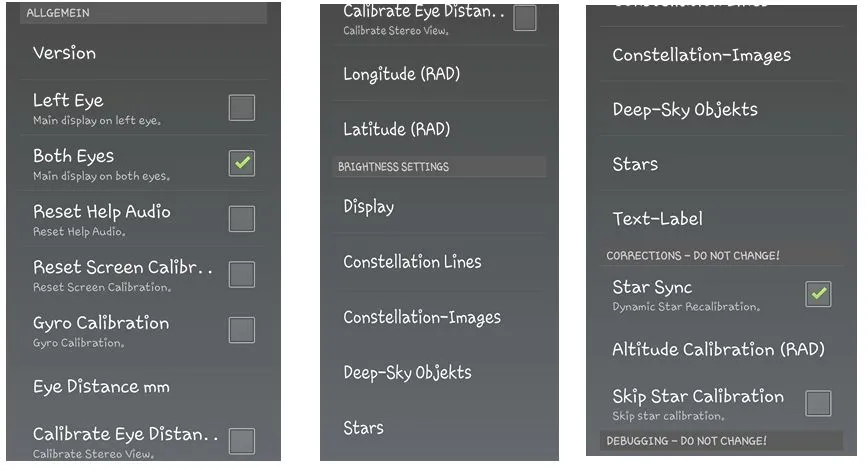
-The calibration is personal, like with binoculars, because the separation of our eyes and other variables differs in each case. There are more detailed calibration options among the app's preferences (which can be accessed manually). A better user experience is achieved after inspecting these options to adapt them to our particular possibilities, but, again, it requires a certain willingness.
The first point is noteworthy: although the use of smartphones has increased to the detriment of more basic phones, there is a wide range and only the most advanced ones (which are also more expensive) have the 4 required sensors. Furthermore, the glasses have a cost (currently 99 Euros). But the restriction is not only economic, but also of willingness, of the effort one is willing to make to use the application correctly.
A possible criticism regarding this type of use of new technologies is that they would be somewhat personal and not communal, not only because the application is not open source, but because ultimately they are personal and virtual glasses.
However, that is not new. Binoculars are also personal, although they can be shared, and those optical devices, like telescopes, also require some effort and practice. The willingness to want everything right now, without effort, existing in part of society, is not very compatible, except in the Sky Map mode which does not require the use of the glasses and "rewards" immediately.
ADVANTAGES: AN OPEN HORIZON OF POSSIBILITIES
To use the application, however, no prior knowledge is needed, since in fact, it is designed for beginners, of any age, who want to know about astronomical objects.
For a somewhat more advanced amateur, the search options and Expert Mode can be complementary to visual observations with a telescope. It should be considered that the object catalog includes Hipparcos, Messier and NGC. The audioguides include the 88 constellations, descriptions and mythology, 120 deep sky objects, satellites and 30 of the brightest stars for a total of more than 3 hours of audio.
Although some very powerful phones on the current market do not have a gyroscope, that may change. Probably until now the inclusion of such a sensor increases the cost of the product and not enough practical applications have been found for it. But mobile technologies are expanding exponentially and it is possible that over time they become more economically accessible.
For those who already have or are thinking of having a high-mid-range phone compatible with this application (the list can be found on the product's website) it is an interesting option to give a practical, entertaining and educational use to the sensors of such phones.
We must not fear new technologies, nor overvalue them. In the spirit of an "ecology" of new media, it is good to know how to find their utility and use value.
I cannot say much regarding acceptance among children, but it is easy to imagine that children under ten years old get frustrated or bored quickly. However, it can also be a new way for adults to share with children, be they sons, nephews or grandchildren, marveling together at the wonders we have above our heads.
Notes
The test was performed by me, with the collaboration of two friends, Daniel and Marcelo, in Capital Federal, Argentina, at the end of November. I hope to complete the test later with the assistance of another person in possession of an iPhone. The test was made possible thanks to the free shipment of the glasses by Ana Feria, whom I thank.
To import the product into Argentina it was necessary to pay fees on the order of $280. The customs and exchange situation in the country may change in the coming months and the fees in other countries will be different. The shipment was obtained quickly and the customs procedure was very simple, directly via the web. The product was received at the door of my house.
The box includes the glasses, bag, head strap and manual (in German). The manual in Spanish can be obtained electronically (PDF).
Requirements:
-Smartphone with 4 sensors: GPS, compass, accelerometer, gyroscope.
-Android with version 4.2 or higher; Apple iOS with operating system 7.0 or higher.
-Phone with maximum dimensions of 147x74x11 mm.
-Free download application, with a free mode and another accessible with a code included in the product box.
Price (as of December 2015): 99 Euros (There may be shipping charges or customs duties for shipping to various countries which will depend on each case).
Quality: It is a German product and respects the tradition of very well-designed products.
Recommended: For amateurs and nerds it can be addictive, useful and fun. If you already own a compatible high-end phone, it is a way to take advantage of its technological capabilities. It can be useful in astronomical observations to locate faint objects and to obtain additional information on some objects.
For these end-of-year holidays, it can be a good gift for the kids, and for yourself.
Sources and related links
- Universe2Go.com
- List of compatible and non-compatible phones
http://universe2go.com/es/producto/smartphones-compatibles/ - Astroshop.es
http://www.astroshop.es/ - Product page on Astroshop.es
http://www.astroshop.es/planetario-personal/omegon-planetario-personal-universe2go/p,45853
About the images
Own screenshots and some images taken from the Universe2Go website.