The Great Worldwide Star Count is an international Citizen Science campaign from October 29 to November 12, 2010. The purpose of this event is to encourage everyone to go outside, look at the night sky, count the stars they see in certain constellations, and report the results online.

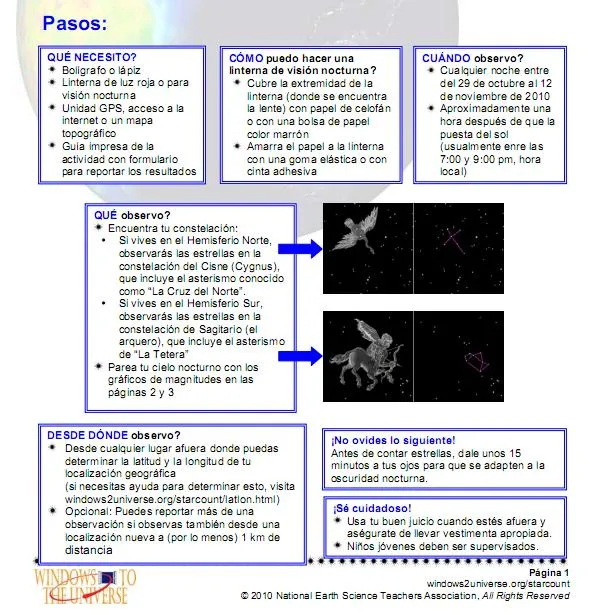
To participate in the Great Worldwide Star Count there is a guide of activities in Spanish with the five necessary steps or tasks, on the Windows to the Universe site:
1-Determine the constellation to observe
2-Find the constellation one hour after sunset
3-Match our night sky with one of the magnitude charts
4-Report what was seen through the web
5-See the results of this international event
Step 1 and 2
We know there are 88 constellations. For this event, those living in the Northern Hemisphere are asked to observe the constellation Cygnus and those of us in the South are asked to observe Sagittarius.
How do we find Sagittarius?
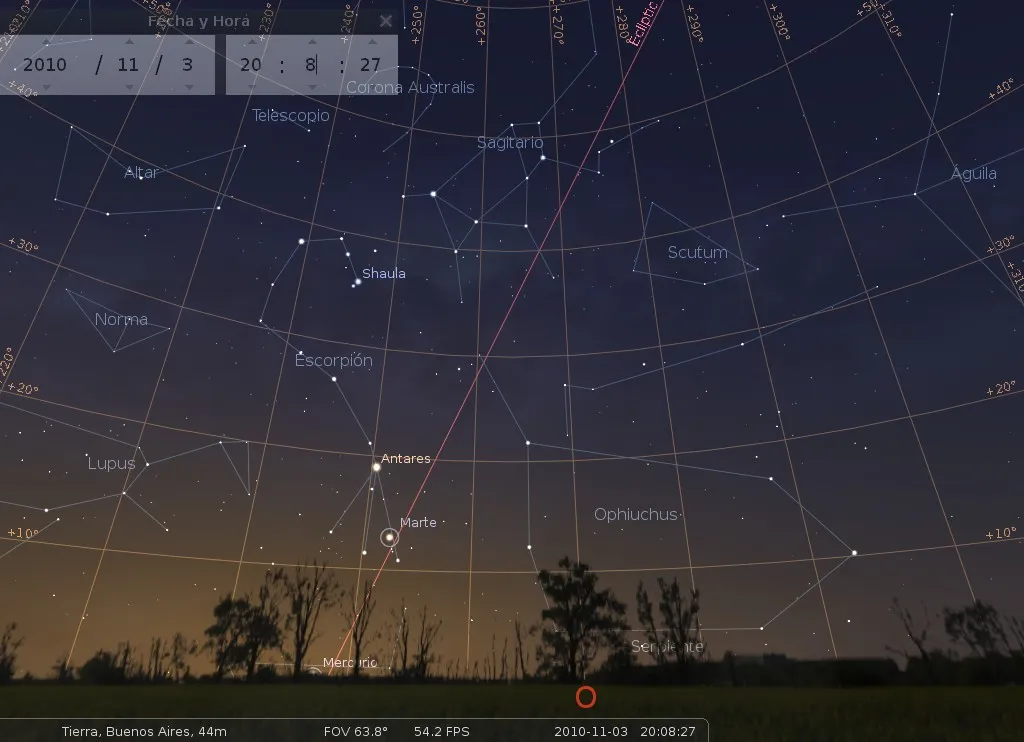
In the Constellation of the Archer is the Teapot. It is not an official constellation, so it is said to be an asterism. On the Windows to the Universe site there is an interactive that allows you to see how the constellation and the asterism are formed. It's in English but what is needed is to locate the stars. Once we stop to observe what the stars of the constellation and the Teapot are like, below we have a view of the sky. Let's try to find the constellation there. If we give up we can move through that sky view with the mouse and we will see where the constellation is.
From Buenos Aires, around 20:00 we can see it about 40º above the horizon, towards the West.
Let's keep in mind that we will see as many stars as light pollution allows us. In fact, this worldwide star count aims to establish the level of pollution that urban centers generate and prevent us from seeing a true dark night sky.
Antares, the red star of Scorpius or Mars could serve as a reference, although not for long, because as the sky seems to move from East to West (it's the Earth that rotates, actually) both will fall below the horizon after 21:00.
Step 3
Now we must compare our sky with some magnitude charts. The idea is to establish how many stars we see and thus determine the level of light pollution at the observation site.
For this we can do the comparison at the moment, printing the activity guide, or, make a drawing of the observed stars and then do the comparison.
Parents are recommended to accompany their children in the activity, especially younger children and, if possible, to do it in the yard or garden and not the children alone on the street.
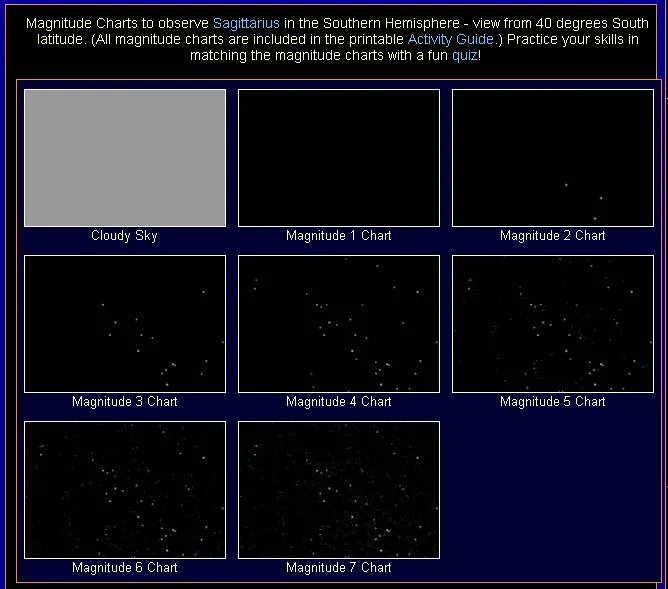
On the Windows to the Universe page we can see the charts. The magnitude number will increase if we see more stars. For example, if we don't see any stars (and it's not cloudy), we will have a magnitude 1 sky. If we see three stars of the constellation, our sky will have magnitude 2 and so on.
On the same page we have a fun way to test the comparison of magnitudes with the real constellation of our sky in an Observation Practice.
The page is in English, but it is not necessary to know the language to use it. It begins with a message indicating the start of the practice. Below there is a little arrow, which we will click on each step. There are eight practice steps, each one more difficult.
The idea is that we will be shown an image of a sky, with Sagittarius. We must indicate what magnitude that sky is, in relation to the previous charts. We can have two web pages open (or tabs) in our browser, so that the comparison is easier.
We select the magnitude we believe is correct and then click the "Check Answer" button. If it says Yes, that is correct, then we got it right.
4-After doing this with a real sky, we must report our observation. It is not necessary that we do this only once. The count is until 11/12 so if we go out to observe and it's cloudy we can do it the next day.
To report the data we must indicate our position on the globe with the geographic coordinates of latitude and longitude. If we don't know that data we can use Geocoder. There we can indicate a city like "Buenos Aires" and/or use the mouse or the arrows on the map to find our exact position. Above the map the necessary data, Latitude and Longitude, will appear.
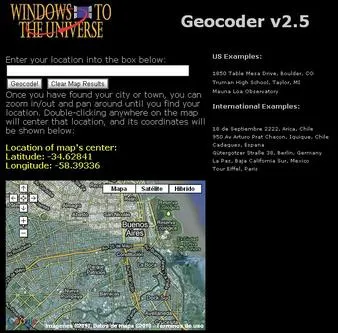
The report is filled out from the Windows to the Universe site. Although it is in English it is simple:
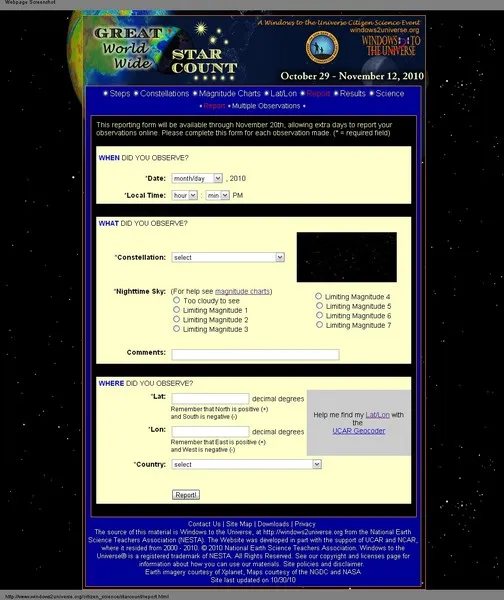
We first indicate the month/day of 2010 on which we made the observation and our local time (hour:minutes). The time in the 00-12 format (that is, if we observe at nine thirty at night, we will indicate 09:30).
Below we choose which constellation we observed, in the case of being from the Southern Hemisphere, Sagittarius.
Further down we have to choose which magnitude chart matched our sky. The first option is to indicate that it was very cloudy and then the seven possible magnitudes.
Further down we can make comments (like if it was very windy, if there were some clouds, etc).
Then we will indicate Latitude and Longitude, as it appeared to us in Geocoder. For example, for Buenos Aires:
Latitude: -34.60842
Longitude: -58.37316
Below we will choose the country from which we observed and, finally, press the Report! button. Done.
On the results page we will be able to see after the count what happened in different parts of the world and what the results of previous years were like.
Can multiple observations be made?
Yes, but in different places, at least 1 kilometer apart between locations. They can be made on different nights, until November 12.
Summary of steps
Sources and related links
About the images
- Screenshots from the Windows to the Universe site.