We've talked here before about the use of metadata embedded in astronomical images. Can we have an example? Yes, let's use Photoshop CS4 to see astronomical metadata.
Let's start at the beginning. What is metadata?
Well, right here you are reading a post. The data it contains is this set of letters your eyes are reading. But this data is related to other data like the author's first and last name, the time and date of publication, etc.
In the same way, when taking a photograph, the content is data related to metadata like the photographer, the date, the place where the image was taken.
On Flickr, Yahoo!'s famous image service, when uploading a photograph, it's possible to know its author, the date and even with which camera the shot was taken. That is data that accompanies the data. Or the electronic "genetic code" of the images. The latter is extremely important. Let's see why.
The value of metadata
Let's look at an astronomical image. Do you have images of galaxies, nebulae or planets on your computer? Perhaps you have wallpapers. Open one of those images and tell me: What object do you see, when was the photograph taken, from where, with what filters, what celestial coordinates does the object have?
It is possible to "add" this data in an attached document or include some in the file name, for example, although the more data we want to include, we start to have problems.
Now imagine the following: You download an image from the web, of an astronomical object, which has a position in the sky, a name, a description, etc.
It is possible to view that image, for example, in Microsoft WorldWide Telescope or in Redshift. But wouldn't it be great if those programs could "read" metadata from the image and display it? When opening an image in these softwares, the object in the image could be positioned in the correct place in the sky representation that those programs enable.
The need for a standard
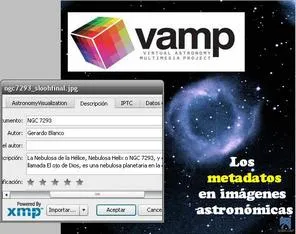
For this to be done efficiently, there is a project, which we already talked about here in "A Review of Virtual Astronomy", called VAMP, Virtual Astronomy Multimedia Project.
We also talked on that occasion about Virtual Observatories. Those observatories have a standard for searching and finding files and their data. Here it's about the same thing, for the images we commonly see on the web or that we can handle in specific programs.
All this is very nice, but perhaps you are like me: I needed a concrete example, some implementation of these ideas.
The Chandra Observatory has been doing extraordinary outreach work on the use of astronomical images. Yesterday, the Observatory published a video/podcast on the use of the AVM standard. And on the VAMP Project page, specific materials on the subject have been included.
For example, the AVM tagging tool with which, from our web browser, we can tag images with this standard.
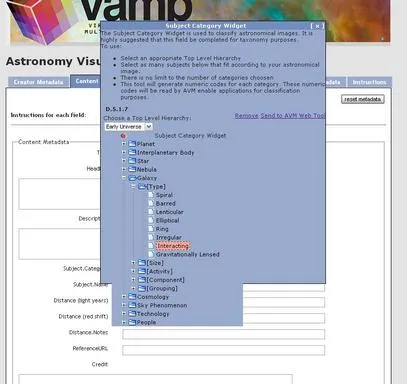
It is a form with tabs for author metadata, content, observation, coordinates and publication. It has 52 AVM tags or labels. By completing the form (you don't need to use all the tags) and submitting it, an XML file in Adobe XMP format will be generated. That file can be included in an image header using Adobe Photoshop CS4 (PS CS4) or Adobe Bridge tools.
The VAMP Project also has a PHP script to convert comma-separated value (CSV) text to XMP.
And, as if that weren't enough, it has an add-on or panel for PS CS4 (and earlier) that is very simple to install. It is a compressed file (.zip) whose content is a folder named AstronomyVisualization and an avm.cfg file.
To install on Windows, the folder must be moved to:
C:\Documents and Settings\[username]\Application Data\Adobe\XMP\Custom File Info Panels\2.0\panels\
Where [username] is our username in the operating system. Probably not all subdirectories will exist and we will have to create them. For example, I had to create the XMP subdirectory (and those it includes) and finally, inside /panels include the mentioned folder.
The other file, avm.cfg must be moved to:
C:\Documents and Settings\[username]\Application Data\Macromedia\Flash Player\#Security\FlashPlayerTrust
These directories should already be created if we have Flash installed, although in my case not in that exact path, but inside Program Data, instead of in Application Data.
Finally, one last step. The previous file must be edited (with a notepad) to include the appropriate path or route:
C:/Documents and Settings/[username]/Application Data/Adobe/XMP/Custom File Info Panels/2.0/panels/AstronomyVisualization/bin/AstronomyVisualization.swf
By including this in the file and saving, the /bin subdirectory and the .swf file will be created automatically.
And now?
Now we return to the VAMP page from where we downloaded this panel for PS CS4 and there, right at the bottom, we can download images, both .tif and .jpg.
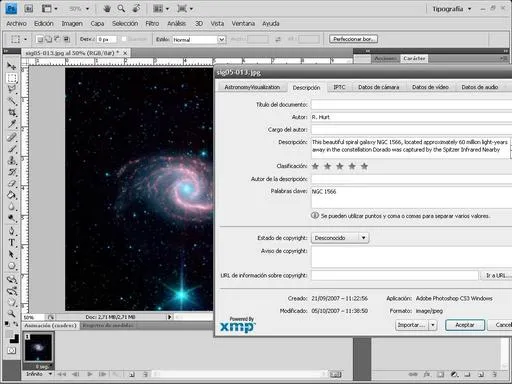
Let's download one, open it in PS CS4 and go to File/File Info (Alt+Ctrl+I) and we will see that the info window now has many tabs with image metadata. For example, this descriptive information appears in the image of NGC 1566, a beautiful spiral galaxy:
And is this common to find in astronomical images?
The reader might wonder if what we achieved is the product of an exception. After all, we didn't download just any image from anywhere, but an image prepared for this purpose.
Ideally, this standard would become established and common in all the images we share in the future.
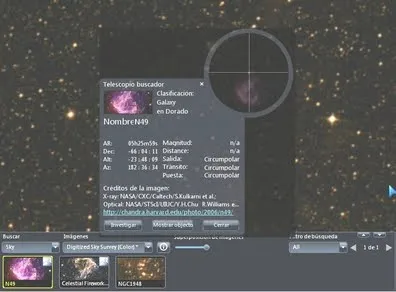
Well, let's see if the Chandra Observatory practices what it preaches. I go to the Chandra site, look for an image, in this case of N49, under the .jpg, even though there are other options, and open the image in PS CS4. I see the file info and voilà! there it is.
Let's see that on the photograph's page there is image metadata right below. But that data, moreover, is "inside" the image, thanks to the fact that, ultimately, it's all bits. And now we can "transport" the data together with the image.
Can we create an image like this ourselves?
Yes, we can add the panel to PS CS4 or earlier and manually type the tags. We can also use the form mentioned before.
For example:
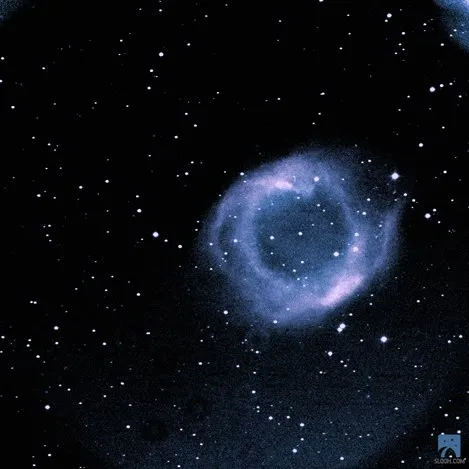
I am a user of Slooh.com, an online observatory. Recently I took an image of NGC 7293.
I went to the AVM form, and I put data related to that astronomical object:
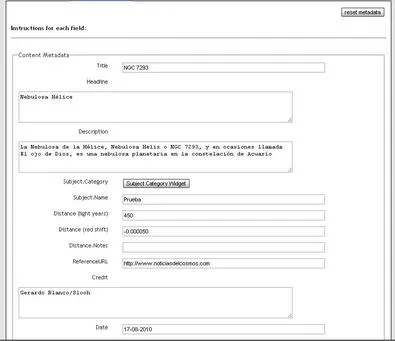
I generated the XML file, opened PS CS 4 and imported the XML:
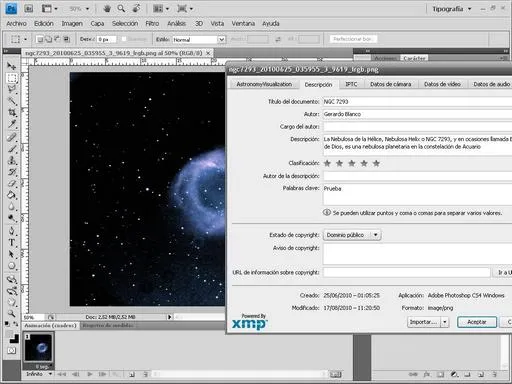
The image shown below has the data "embedded."
And how do I know the object's location on the celestial sphere?
We can obtain the coordinates, WCS (World Coordinate System) at http://www.astrometry.net/use.html, by registering as an alpha tester.
If we have a FITS image, which will surely already have that data, we can obtain it for outreach images with a program that, for now, is only available for Mac OS, called PinpointWCS.
Or we can use SEDS to obtain that and complementary information.
Conclusion
What we did was spy a little on something that will apparently become increasingly common: the use of metadata in astronomical images for outreach. We had already talked about FITS images that include metadata, but that is a format used by professional astronomers, through very specific software.
The idea is to bring this metadata to the images we can usually see and download on sites like Chandra, Spitzer, Hubble, etc.
But this is not enough. Hand in hand, there should be an increasing number of websites (like the already existing Flickr and Wikisky) that can read and display this data, as well as more software that uses this information.
However, what was once just a beautiful idea now seems something tangible, within reach of any of us, who do not precisely have "astronomical" knowledge.
Sources and related links
- Sharing Images Intelligently : The Astronomy Visualization Metadata Standard
- http://www.virtualastronomy.org/
About the images
- Own screenshots.