The MINERVA application is a tool developed to help students learn more about the ATLAS experiment and particle physics at CERN. Also, LHC@Home, renewed.
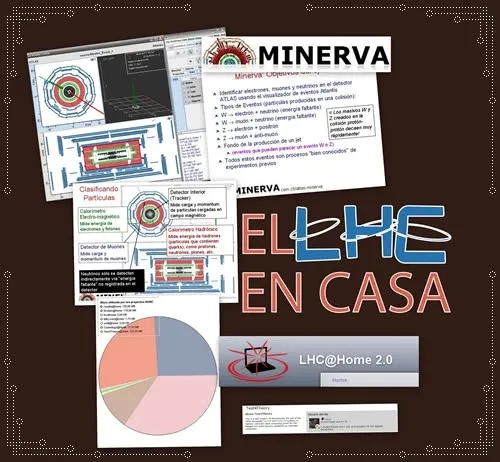
MINERVA is based on Atlantis, the event visualizer used in ATLAS to see what happens in the detector. The goal of MINERVA is to give students a better understanding of how particle detectors work and the particle physics they study. Currently, in MINERVA, students can study W and Z boson events by observing their decay products and apply this knowledge to the search for the Higgs boson. Students can also search for the decay of neutral hadrons by looking for pairs of oppositely charged tracks originating from a vertex that is displaced from the main interaction.
MINERVA has been used around the world in Particle Physics Masterclasses since 2008, using simulated data. In the spring of 2011, real LHC collision data will be used for the first time in a series of international Masterclasses.
The MINERVA project is a joint venture between the Rutherford Appleton Laboratory (RAL) and the University of Birmingham.
To access MINERVA (acronym for Masterclass INvolving Event Recognition Visualised with Atlantis) we will go to: http://atlas-minerva.web.cern.ch/atlas-minerva/.
Upon entering the site we will see two buttons, one to Launch Minerva and another for resources.
The application can be run online or downloaded. For the latter and to better understand what it is and how to use this resource we will go to the Masterclass Resources option. That will redirect us to another website, for now only in English.
The application is created in Java, and it is necessary to have Java installed for it to run.
When downloading the recommended zip file (from the resources page) we will have on our PC the Atlantis application and a set of test events.
To run the application it is enough to double-click on Atlantis.jar.
What we will see is this:
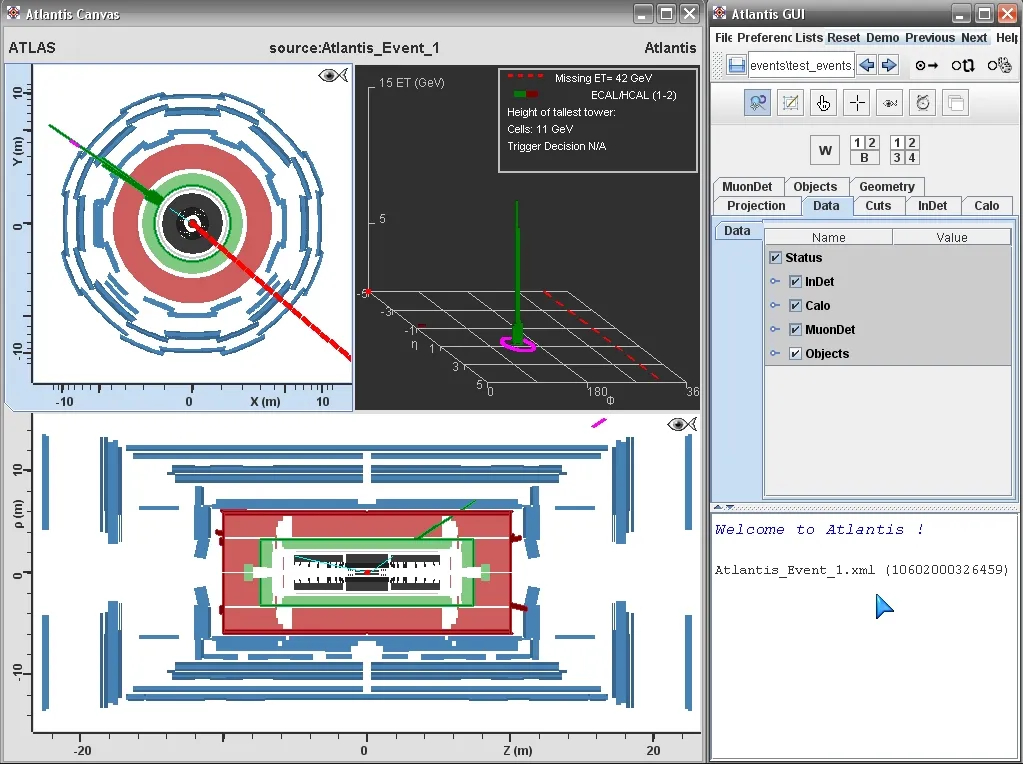
To understand what we are seeing we can access pdf tutorials and also inspect the website:
The event visualizer shows the same event in three different views: from the back, from the side and the calorimeter rolled out.
In green the electromagnetic calorimeter is shown.
In Red the hadronic calorimeter is shown.
In black the inner detector or Tracker is shown.
In blue the muon detector is shown.
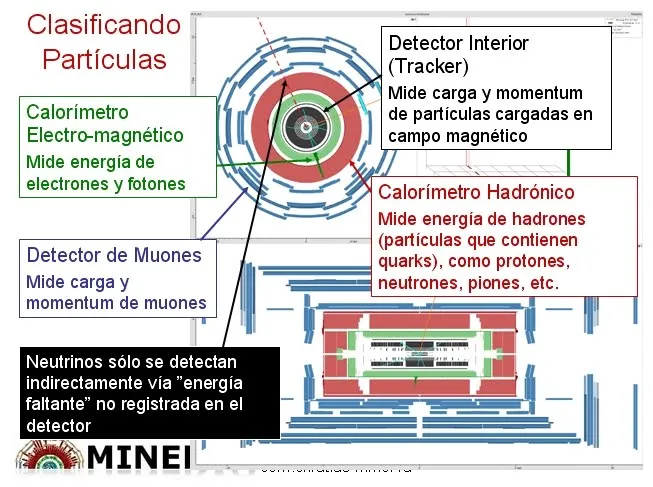
The idea is that the initial dataset (test events) must be classified into one of five categories. First there are 5 practice events.
How to know if we have classified the events correctly?
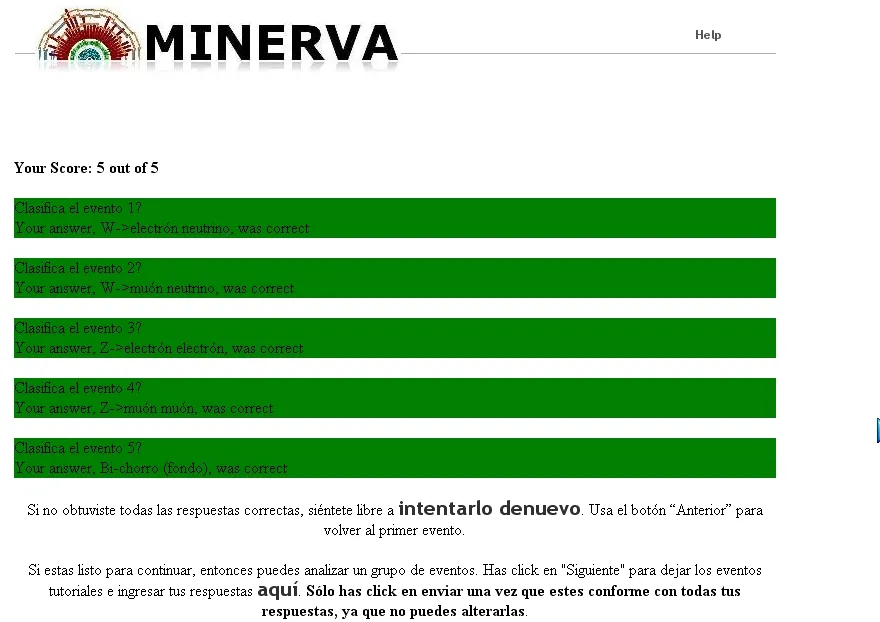
Once we go through the website we will reach Submit answers. From experience, that new page does not load well in all web browsers.
That page, in Firefox, looks like this:
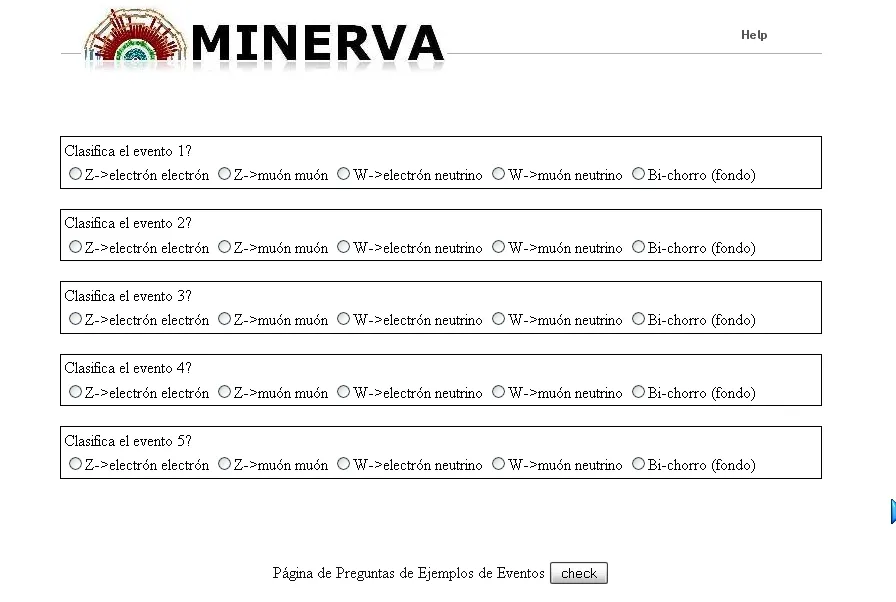
And how will we know how to classify each event?
Well, that's the most interesting part.
If we go to the help section, we will find a tutorial pdf:
http://atlas-minerva.web.cern.ch/atlas-minerva/answers/help.html
And on the resources page indicated before, we will have more help.
The first tutorial pdf indicated is short, but the ppt presentation or in PDF format from the resources page (where it says paperwork) is much more detailed.
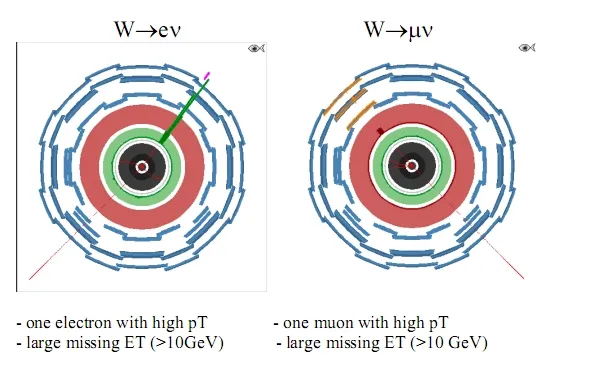
A first graphical approach is the following:
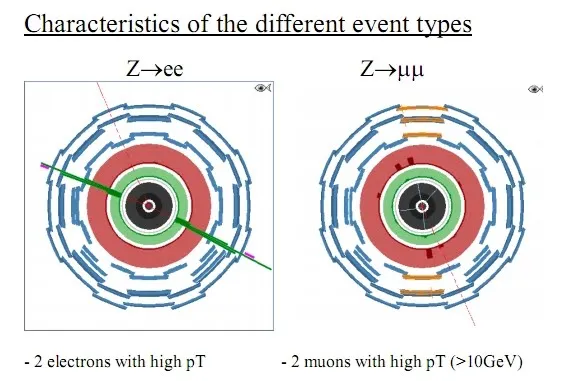
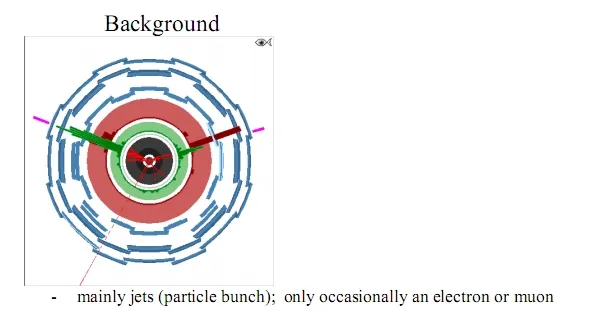
Muon identification (u)
-track (red dots) in the muon detector (blue detector)
-corresponding track (blue line) in the black detector.
Electron identification (e)
-large energy deposit in the EM calorimeter (green)
-No energy deposit in the H calorimeter (red)
-track (blue line) in the black detector in front of the calorimeter
Jet identification
-large energy deposit in EM (green)
-energy deposit in H (red)
-multiple tracks (blue lines) in the black detector.
-Neutrino identification (v)
-indirectly by the missing energy, ET, dotted red line.
With the PDF presentation we have more examples:
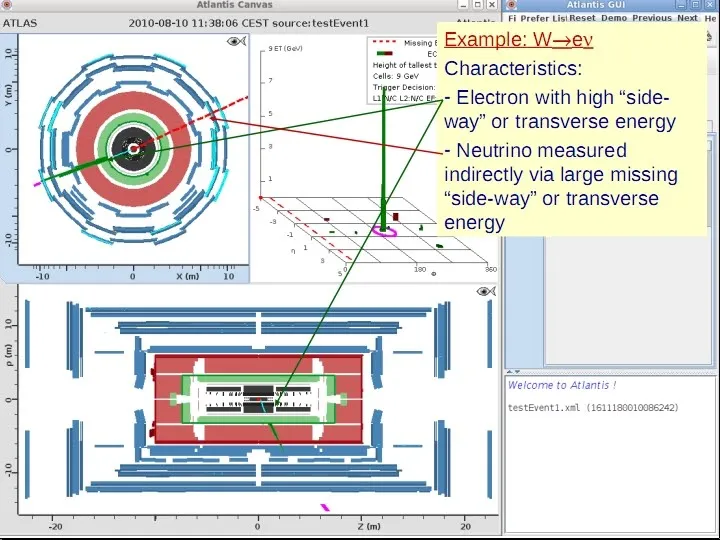
Example of W->ev
Characteristics:
Electron with large transverse energy
Neutrino measured indirectly by that large "side-way" energy.
The electron deposits its energy in the EM calorimeter (green)
What we see here is energy deposited in space. The length gives the magnitude, but it does not mean it comes out of the calorimeter, it's all inside.
Also the track in the black detector is seen as a light blue line.
We see this in both views. This track, if it is an electron, must have a momentum of pt>10GeV. To know, on the right we have an Atlantis GUI with a set of icons. We press the "hand" icon, then we press the track in the black detector (the light blue line). When doing so, the selected track will turn gray and on the right and bottom a series of data will appear, among which is PT.
In event 1:
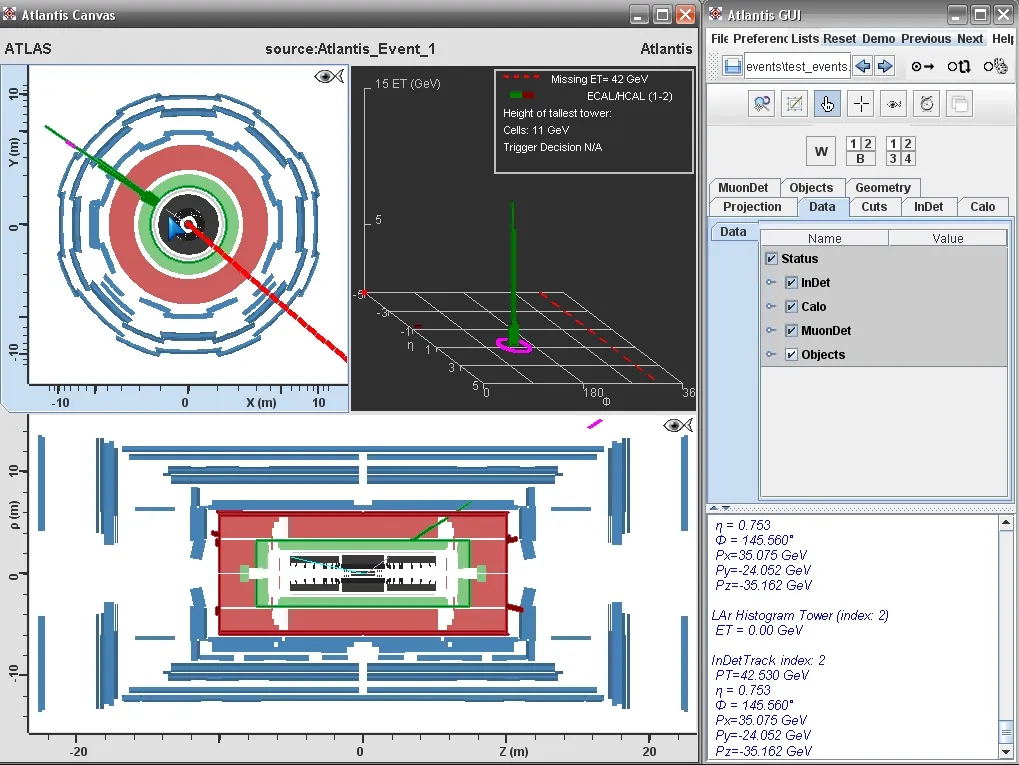
Also, the electron deposits transverse energy (side-way energy, ET) in the EM. To see it, we use the hand icon and press the purple-pink part and see the data.
In event 1:
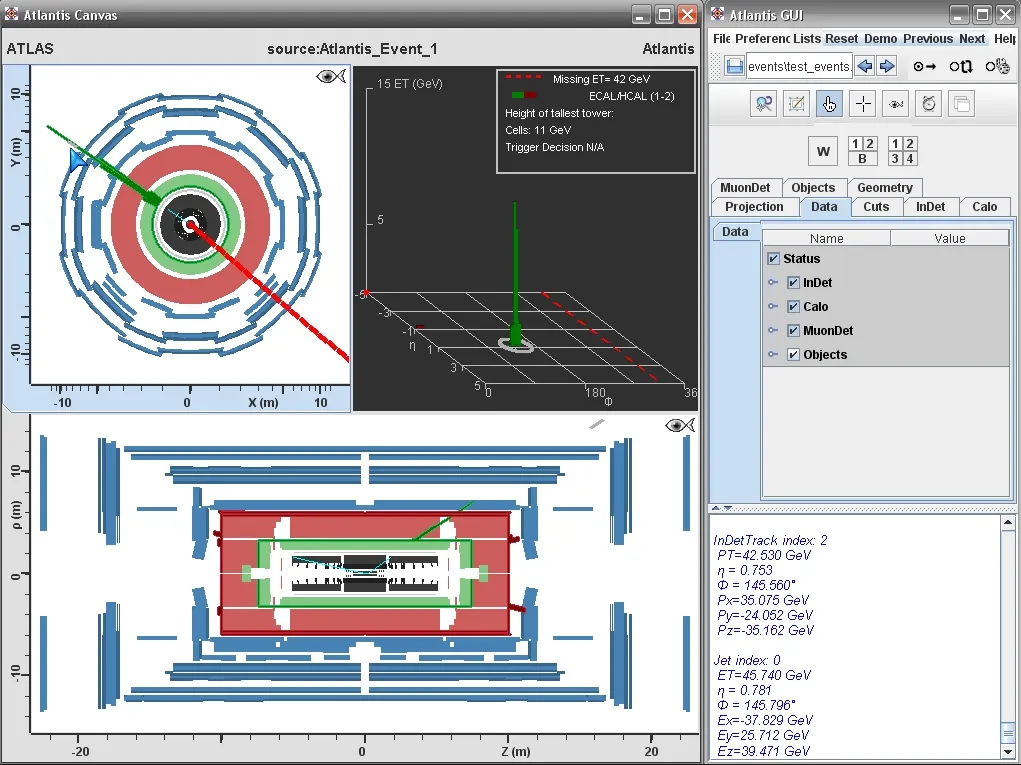
(In the images you see a blue pointer from my mouse and not the pointer used in the GUI, but it's the same).
The neutrino is measured indirectly by the missing energy (ET miss) greater than 10GeV. It is the dotted red line whose value is given by the second graph in the application.
Based on the above, event 1 is of type W->ev, so we choose that option on the answers page.
Immediately after, on the right side of the application, at the top, we press the "next" icon (arrow to the right) and we can classify another event.
This way we can learn how to classify each event. The first five are relatively easy. Afterwards it is possible to run other more difficult datasets.
More citizen science with the LHC

When LHC@Home was launched in 2004 it was done with the idea of being a public participation project in the celebration of CERN's 50th anniversary. But after a couple of weeks online, the project had thousands of associated computers.
But with the advent of better computers and virtual machine software -which allows computers to mimic different operating systems-, there are new questions that can be answered thanks to distributed volunteer computing. A new project, LHC++@Home, will run high-energy physics simulations on ordinary computers. Although it is in the testing stage, the project will soon be a way for volunteers to help CERN scientists conduct research from the comfort of their home.
LHC@Home 2.0 runs simulations that are important because solving the dynamics of many particles is as difficult as building the accelerators and experiments that perform the collisions in the real world. The first project on the platform is called Test4Theory.
To join LHC@Home 2.0 you need an invitation code. You can get one by sending an email to the project managers. I don't know if they evaluate the request in some way or if they simply send the code to everyone who asks. I requested it and got it immediately. One of the people in charge of granting those requests is a Spaniard: Daniel Lombraña González.
To run these simulations you need two applications installed:
VirtualBox and the BOINC client.
Before installing VirtualBox we must know if we have the necessary resources: at least 512 MB of RAM and more than 9 GB of free disk space.
If we have this, we can then download the application according to our operating system.
Then, if we don't have it, we will install the BOINC client for the corresponding operating system.
To include Test4Theory in BOINC we must create an account on the project page, after which it will be easy to add the project to BOINC, with the URL: http://boinc01.cern.ch/test4theory.
It is possible that the application does not download tasks (Workunits) or that it ends abruptly or that VirtualBox does not run well. For all these or other problems there is a forum.
Sometimes, those of us who use these applications are a bit solitary and don't like to ask questions, but rather find a solution on our own. However, in this case, it is good to report these obstacles anyway because that's why it's a test version.
In fact, I am having some problems and I have been trying to solve them, without finding a solution yet.
However, there are several people who run it without obstacles and it is another way to use our computer's idle time for useful purposes.
Note written for the XXI Carnival of Physics, in this edition hosted by La vaca esférica. To join and read the entries there is a social network on Ning.
Sources and related links
- MINERVA
- LHC@Home 2.0
About the images
- Screenshots of MINERVA. Credit: CERN-Rutherford Appleton Laboratory (RAL) and the University of Birmingham.
- Screenshot of LHC@Home. Credit: CERN.