The possibilities offered by Java Applets allow them to be used as an educational resource or as a way to add relevant information to a news story or popular science article. Here I mention some sites with examples and develop a case, linked to a recent news story.
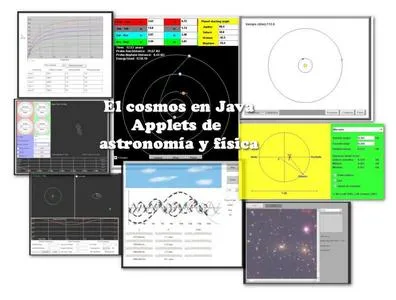
Dynamical Astronomy Javalab is a site from Case Western University, from the Astronomy department. There we will find a variety of Java applets that explore planets, stars and galaxies. Each applet contains background information, technical description and links.
It is a site by Chris Mihos, a Professor at that institution and a Doctor in astronomy from the University of Michigan.
Although it has several applets, there is one particularly interesting one that these days is related to a news story. I am going to develop this case a bit and then I will comment on other examples from the same site. At the end, I will give a list of links to websites in Spanish and related ones.
An Applet with an example
In the Moons applet, observations of Jupiter's moons are simulated and Kepler's third law is used to derive the planet's mass.
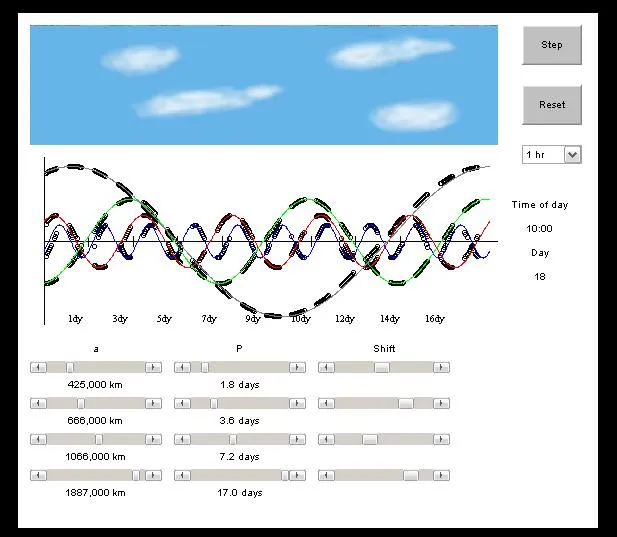
The idea here is that observations will be simulated step by step in the applet. Each observation can be set to 1, 3 or 6 hours or 1 day.
Each time the Step button is pressed, a step is taken, an observation.
For example, if we leave the time value at 1 hr., pressing Step will show the observations of the four Galilean moons. Pressing Step again, the same. Between each observation, 1 hour is assumed to have passed. In the upper rectangle we will see Jupiter and its moons, but not always. As in any observation, we might get bad weather and of course we cannot observe during the day. In those cases we will see clouds or the daytime sky respectively.
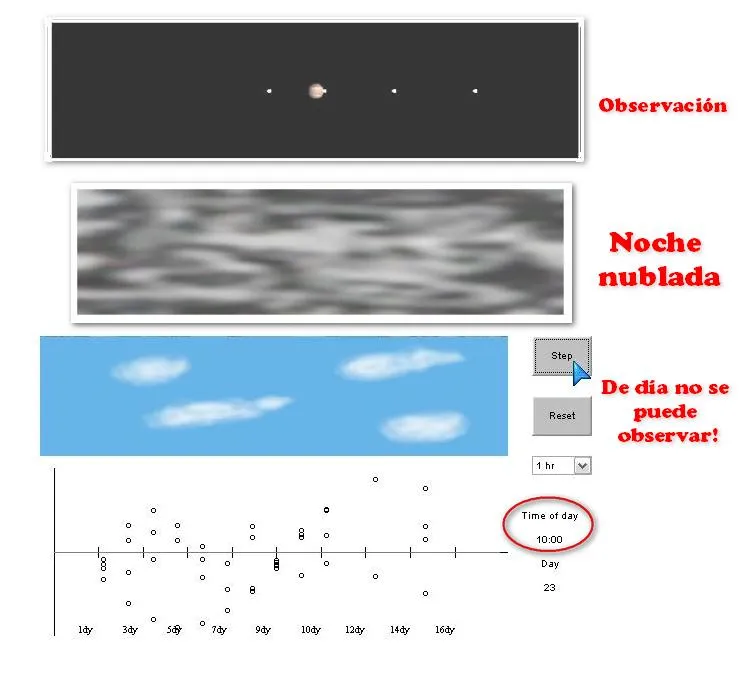
As we keep pressing Step, some circles are drawn below the rectangle. They are the position of each of the moons at each step.
Below we have four rows of sliders in three columns.
Each row represents the sliders for one moon, starting from top to bottom from the closest to the farthest. By moving the sliders, both the a (distance) slider and the P (period) slider, we can create a sinusoidal wave.
The idea is that for each set of little circles of each moon we graph the corresponding wave.
To make this easier, it is advisable to start with the time at 1hr, and go step by step until collecting the first circles. Shortly after starting, let's begin trying to graph the waves. It is better, I think, to start with the farthest moon, the one in the last row of sliders, which will generate the longest wave.
Once we have a few circles and have already drawn the waves, let's keep pressing Step many times. The logical thing would be for the circles to match the drawn waves. If not, we must correct with the sliders.
The Shift slider allows us to "shift" the wave to match better.
When we have many, many data (little circles) that match the waves, we will be in a position to calculate Jupiter's mass.
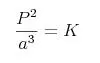
In principle, we could verify that, for each moon, the difference of the period squared divided by the distance cubed is a constant. Logically we will get a similar value, but hardly equal.
Kepler's Third Law
Four centuries ago Kepler began to state his three well-known laws:
1-Planets describe elliptical orbits, with the Sun at one of their foci
2-The imaginary line joining the planet to the Sun (radius vector) sweeps equal areas in equal times.
3-The square of the orbital period of a planet is directly proportional to the cube of the length of the semi-major axis of its orbit, and this is a constant value (what we said above), where T is the orbital period (the time it takes a planet to go around the Sun once), a is the mean distance of the planet from the Sun (to put it correctly, the length of the semi-major axis) and K is the constant of proportionality.
These laws were empirical, based on observations, but without establishing why this happened. It was Newton who, with his law of gravity, gave this third law its true meaning.
When Newton applied the law of gravity to Kepler's third law, he realized its importance: it is a way to calculate the mass of a planet. The mysterious constant in Kepler's third law is determined by the mass of the object being orbited.
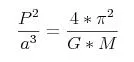
where G is the gravitational constant and M is the mass of the orbited object.
If we solve for M in this formula:
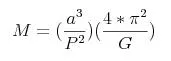
With this expression in hand, we can use the observations of Jupiter's moons to measure the mass of that planet.
If we measure the period in days and the distance of the moons from Jupiter in kilometers, we can use the Third Law to calculate the mass of the giant in kilograms with the gravitational constant given by 5*10-10.
Someone will quickly say it is wrong, since the constant is 6.67*10-11, which is true but in meters and seconds. The previous value is a good approximation to use with days (seconds times 60*60*24) and meters (kilometers*1000).
Thus, first I perform the observations:
Then I take the data to perform the calculations. For this I used a spreadsheet in OpenOffice Calc with variable data and constants, so that by only indicating P and a, I get the result automatically. Here are four printouts using, in each case, the data of the four moons of Jupiter from the Cosmos applet simulation:
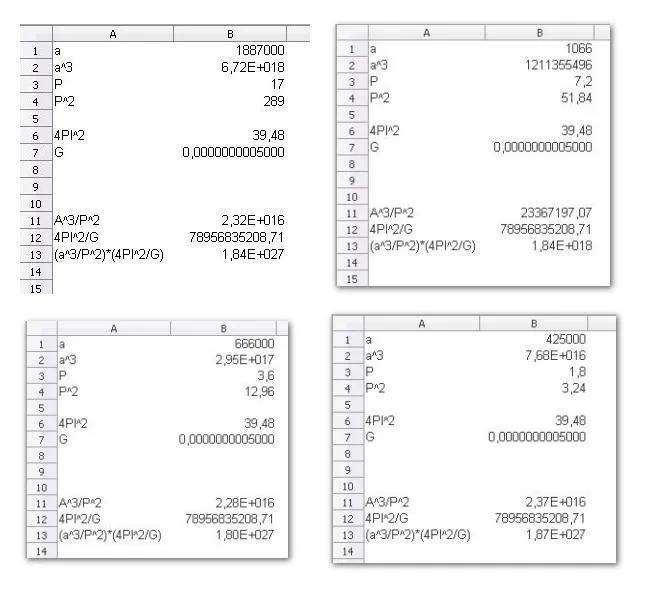
The spreadsheet contains:
the value of a (in B1), the formula to cube the value of B1 (in B2), the value of P (in B3), the formula to square the value of B3 (in B4). The result of 4*PI^2 in B6 and the value of the constant in B7.
In B11 and B12 I solve each parenthesis (B2/B4 and B11/B12) and finally in B13 I multiply B11 and B12. That is, step by step. It is evident that for one of the moons the data should be modified, as there is a greater difference than with the rest...
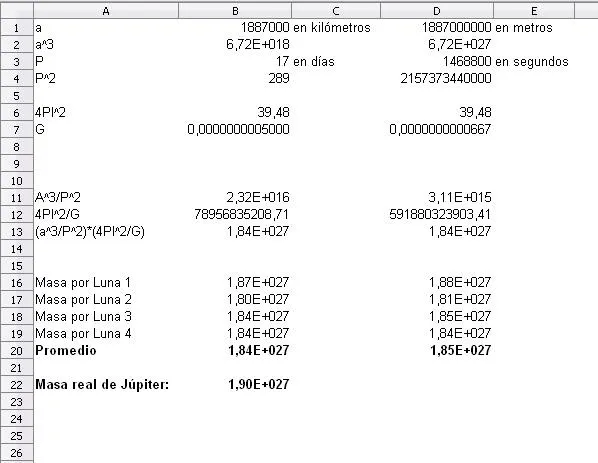
Here I show the same spreadsheet, but modified so that on the side I have the same data converted to meters and seconds, with the usual gravitational constant and the results compared:
Applet Kepler's Laws
http://csep10.phys.utk.edu/guidry/java/kepler/kepler.html
A weighty news story
This Friday a press release circulated with the title How do astronomers weigh a star?
A new work by astrophysicist David Kipping says that in special cases, if the star has a planet and the planet, a moon, and both cross in front of the star (transit), it is possible to measure the sizes and orbits to learn about the star.
"Basically we measure the orbit of the planet around the star and the moon around the planet. Then, through Kepler's Third Law, it is possible to calculate the mass of the star," explained Kipping.
Well, what we just did with the Moons applet, is not very different. And perhaps, telling it this way (with the possibility that you yourself try the applet) makes it more understandable, no?
Other applets from Dynamical Astronomy Javalab
In Galaxy Crash we can simulate two interacting galaxies. The nuclei of both will be seen as little green (main galaxy) and red (companion) squares.
The controls allow us to Start, stop (stop) and reset (reset) the simulation.
Also with the mouse we can rotate the view. There are options to center the main galaxy (Green Centered), to have the simulation use friction (to allow mergers), make the large dark matter halos four times larger and more massive (they are invisible, but influence the interaction of the galaxies).
It is also possible to change the distance of the galaxies, in kiloparsecs (Peri), change the mass of the red galaxy in terms of the main one (Red galaxy mass), modify the inclination and spin of both (Galaxy theta, phi, Companion theta, phi) and the number of stars.
In SOS you can study the orbits of stars in galaxies. See how the shape of galaxies affects stellar orbits and learn about the tools for classification.
In RotCurve we can use the rotation curves of spiral galaxies to learn about dark matter in galaxy halos.
In COSMO we will see how the age and size of the universe change under different cosmologies.
Below the applet's graph we will see a table to enter data. For each cosmology case we must indicate the Hubble Constant, a mass parameter and an acceleration parameter.
For the Hubble Constant it is noted that observational data suggest values between 50 and 80 km/s/Mpc. Here we can test up to 500!
Omega parameter: a matter density parameter between 0 and 2.5
Omega: Acceleration parameter between 0 and 2.5.
In Cannibal we can simulate satellite galaxies interacting with the primary one.
In Clusters we can study the properties of galaxies in clusters to derive their mass and learn about dark matter.
In Voyages we learn about Hohmann transfer orbits and how to calculate spacecraft trajectories for missions across the solar system.
Here there are two applets, one for a mission to Mars and a Grand Tour with the Voyagers.
More about Java applets
A Java applet is a small application, a small piece of software written in the Java programming language. Java applets can run in a web browser, which gives them enormous flexibility by not requiring any installation. Well, that's not entirely true. It is necessary first to install the Java Virtual Machine (JVM) or JRE, but that is something we install only once. Then, for each particular applet, nothing else is needed. It should be said that they can also be viewed in Sun's AppletViewer.
Applets in Spanish
The idea of writing something about applets came to me a while ago and I started collecting examples on the web. Many of them are in English, but there are excellent demonstrations and step-by-step explanations in Spanish, unmissable.
Finally, since the Moons example seemed great to me, I decided to develop that example and I publish it now because of the related news. However, I would not want to fail to mention the very good sites with applets in our language.
For this I have created a multiURL that can be accessed as:
List of applets, or as
Applets Toolbar.
In both cases the links are the same and contain the links used in this post, links to websites in Spanish, tutorials on how to create applets and Sun's site, among others.
Note written for the XII Carnival of Physics, in this edition hosted by Francis (th)E mule. To join and read the entries there is a social network on Ning.
Sources and related links
- The Cosmos on a Computer: Computational JavaLabs for Astronomy Education
Chris Mihos (CWRU) & Greg Bothun (Oregon) - A review of virtual astronomy
- Simple simulations with Java
About the images
- Own screenshots and from Chris Mihos's Dynamical Astronomy Javalab. The equations were made with the editor from Rincón Matemático.